[1]:
import warnings

warnings.simplefilter("ignore")
Model Training
In this tutorial we are going to train a model from scratch on a molecular dataset from the MD17 collection. Start by creating a project folder and downloading the dataset.
Acquiring a dataset
You can obtain the benzene dataset with DFT labels either by running the following command or manually from this link. Apax uses ASE to read in datasets, so make sure to convert your own data into an ASE readable format (extxyz, traj etc). Be careful the downloaded dataset has to be modified like in the apax.utils.dataset.mod_md_datasets function in order to be readable.
[2]:
from pathlib import Path

from apax.utils.datasets import download_etoh_ccsdt, mod_md_datasets

data_path = Path("project")

train_file_path, test_file_path = download_etoh_ccsdt(data_path)
train_file_path = mod_md_datasets(train_file_path)
test_file_path = mod_md_datasets(test_file_path)
Configuration files
Next, we require a configuration file that specifies the model and training parameters. In order to get users quickly up and running, our command line interface provides an easy way to generate input templates. The provided templates come in in two levels of verbosity: minimal and full. In the following we are going to use a minimal input file. To see a complete list and explanation of all parameters, consult the documentation page LINK. For more information on the CLI, simply run apax -h.
[3]:
!apax -h
 Usage: apax [OPTIONS] COMMAND [ARGS]...

╭─ Options ────────────────────────────────────────────────────────────────────╮
│ --version             -V                                                     │
│ --install-completion            Install completion for the current shell.    │
│ --show-completion               Show completion for the current shell, to    │
│                                 copy it or customize the installation.       │
│ --help                -h        Show this message and exit.                  │
╰──────────────────────────────────────────────────────────────────────────────╯
╭─ Commands ───────────────────────────────────────────────────────────────────╮
│ docs       Opens the documentation website in your browser.                  │
│ eval       Starts performing the evaluation of the test dataset with         │
│            parameters provided by a configuration file.                      │
│ md         Starts performing a molecular dynamics simulation (currently only │
│            NHC thermostat) with parameters provided by a configuration file. │
│ schema     Generating JSON schemata for autocompletion of train/md inputs in │
│            VSCode.                                                           │
│ template   Create configuration file templates.                              │
│ train      Starts the training of a model with parameters provided by a      │
│            configuration file.                                               │
│ validate   Validate training or MD config files.                             │
│ visualize  Visualize a model based on a configuration file. A CO molecule is │
│            taken as sample input (influences number of atoms, number of      │
│            species is set to 10).                                            │
╰──────────────────────────────────────────────────────────────────────────────╯
The following command create a minimal configuration file in the working directory. Full configuration file with descriptiond of the parameter can be found here.
[4]:
!apax template train --full
Open the resulting config.yaml file in an editor of your choice and make sure to fill in the data path field with the name of the data set you just downloaded. For the purposes of this tutorial we will train on 1000 data points and validate the model on 200 more during the training. Further, the units of the labels have to be specified. Random splitting is done by apax but it is also possible to input a pre-splitted training and validation dataset.
In order to check whether the a configuration file is valid, we provide the validate command. This is especially convenient when submitting training runs on a compute cluster.
[5]:
!apax validate train config_full.yaml
1 validation errors for config
n_epochs
  Input should be a valid integer, unable to parse string as an integer
  input_type: str
  input: <NUMBER OF EPOCHS>

Configuration Invalid!
Configuration files are validated using Pydantic and the errors provided by the validate command give precise instructions on how to fix the input file. The filled in configuration file should look similar to this one.
data:
  batch_size: 4
  data_path: project/ethanol_ccsd_t-train_mod.xyz
  directory: project/models
  energy_unit: kcal/mol
  experiment: ethanol_ccsd_t_cli
  n_train: 990
  n_valid: 10
  energy_unit: kcal/mol
  pos_unit: Ang
  valid_batch_size: 100
loss:
- name: energy
- name: forces
  weight: 4.0
metrics:
- name: energy
  reductions:
  - mae
- name: forces
  reductions:
  - mae
  - mse
model:
  descriptor_dtype: fp64
n_epochs: 100
It also can be modefied with the utils function mod_config provided by Apax.
[6]:
import yaml

from apax.utils.helpers import mod_config

config_path = Path("config_full.yaml")

config_updates = {
    "n_epochs": 100,
    "data": {
        "n_train": 990,
        "n_valid": 10,
        "valid_batch_size": 10,
        "experiment": "ethanol_ccsd_t_cli",
        "directory": "project/models",
        "data_path": str(train_file_path),
        "test_data_path": str(test_file_path),
        "energy_unit": "kcal/mol",
        "pos_unit": "Ang",
    },
}

config_dict = mod_config(config_path, config_updates)

with open("config_full.yaml", "w") as conf:
    yaml.dump(config_dict, conf, default_flow_style=False)
[7]:
!apax validate train config_full.yaml
Success!
config_full.yaml is a valid training config.
Training
Model training can be started by running
[8]:
!apax train config_full.yaml
WARNING: All log messages before absl::InitializeLog() is called are written to STDERR
E0000 00:00:1732268187.845256  520474 cuda_dnn.cc:8310] Unable to register cuDNN factory: Attempting to register factory for plugin cuDNN when one has already been registered
E0000 00:00:1732268187.848463  520474 cuda_blas.cc:1418] Unable to register cuBLAS factory: Attempting to register factory for plugin cuBLAS when one has already been registered
INFO | 09:36:31 | Running on [CudaDevice(id=0)]
INFO | 09:36:31 | Initializing Callbacks
INFO | 09:36:32 | Initializing Loss Function
INFO | 09:36:32 | Initializing Metrics
INFO | 09:36:32 | Running Input Pipeline
INFO | 09:36:32 | Reading data file project/ethanol_ccsd_t-train_mod.xyz
INFO | 09:36:32 | Found n_train: 990, n_val: 10
INFO | 09:36:32 | Computing per element energy regression.
INFO | 09:36:33 | Building Standard model
INFO | 09:36:33 | initializing 1 model(s)
INFO | 09:36:40 | Initializing Optimizer
INFO | 09:36:40 | Beginning Training
Epochs:   0%|                                                               | 0/100 [00:00<?, ?it/s]WARNING | 09:36:47 | SaveArgs.aggregate is deprecated, please use custom TypeHandler (https://orbax.readthedocs.io/en/latest/custom_handlers.html#typehandler) or contact Orbax team to migrate before August 1st, 2024.
Epochs: 100%|████████████████████████████████████| 100/100 [00:59<00:00,  1.69it/s, val_loss=0.0287]
INFO | 09:37:39 | Finished training
During training, apax displays a progress bar to keep track of the validation loss. This progress bar is optional however and can be turned off in the config. The default configuration writes training metrics to a CSV file, but TensorBoard is also supported. One can specify which to use by adding the following section to the input file:
callbacks:
    - CSV
If training is interrupted for any reason, re-running the above train command will resume training from the latest checkpoint.
Furthermore, an Apax training can easily be started within a script.
[9]:
from apax.train.run import run
from apax.utils.helpers import mod_config

config_path = Path("config_full.yaml")

config_updates = {
    "data": {
        "experiment": "ethanol_ccsd_t_script",
    },
}

config_dict = mod_config(config_path, config_updates)

run(config_dict)
WARNING: All log messages before absl::InitializeLog() is called are written to STDERR
E0000 00:00:1732268260.595895  520335 cuda_dnn.cc:8310] Unable to register cuDNN factory: Attempting to register factory for plugin cuDNN when one has already been registered
E0000 00:00:1732268260.599126  520335 cuda_blas.cc:1418] Unable to register cuBLAS factory: Attempting to register factory for plugin cuBLAS when one has already been registered
Epochs:   0%|                                                               | 0/100 [00:00<?, ?it/s]WARNING | 09:37:58 | SaveArgs.aggregate is deprecated, please use custom TypeHandler (https://orbax.readthedocs.io/en/latest/custom_handlers.html#typehandler) or contact Orbax team to migrate before August 1st, 2024.
Epochs: 100%|████████████████████████████████████| 100/100 [01:01<00:00,  1.62it/s, val_loss=0.0287]
[10]:
import matplotlib.pyplot as plt
import numpy as np

from apax.utils.helpers import load_csv_metrics

metrics_path = "project/models/ethanol_ccsd_t_script/log.csv"
keys = ["energy_mae", "forces_mse", "forces_mae", "loss"]

data_dict = load_csv_metrics(metrics_path)

fig, axes = plt.subplots(2, 2, constrained_layout=True)
axes = axes.ravel()
fig.suptitle("Metrics", fontsize=16)

for id, key in enumerate(keys):
    val = np.array(data_dict[f"val_{key}"])
    train = np.array(data_dict[f"train_{key}"])
    epoch = np.array(data_dict["epoch"])

    axes[id].plot(epoch, val, label="val data")
    axes[id].plot(epoch, train, label="train data")

    axes[id].set_ylabel(f"{key}")
    axes[id].set_xlabel(r"epoch")

plt.legend()
plt.show()

Evaluation
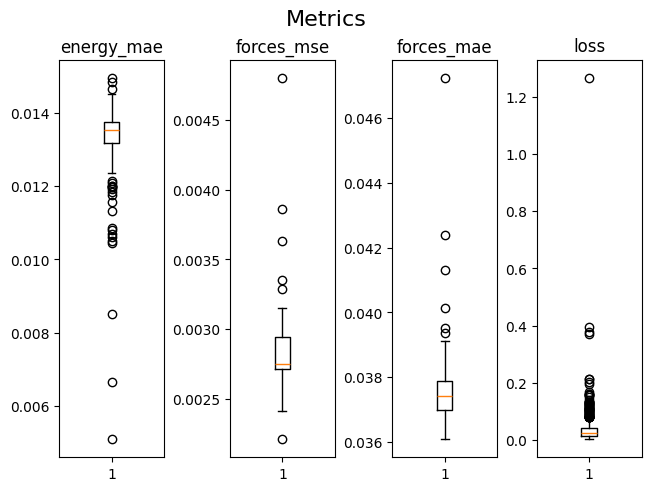
After the training is completed and we are satisfied with our choice of hyperparameters and vadliation loss, we can evaluate the model on the test set. We provide a separate command for test set evaluation:
[11]:
from apax.train.eval import eval_model

eval_model(config_dict)
Structure: 100%|███████████████████████████████| 999/999 [00:04<00:00, 228.47it/s, test_loss=0.0253]
[12]:
!apax eval config_full.yaml
WARNING: All log messages before absl::InitializeLog() is called are written to STDERR
E0000 00:00:1732268339.519757  522195 cuda_dnn.cc:8310] Unable to register cuDNN factory: Attempting to register factory for plugin cuDNN when one has already been registered
E0000 00:00:1732268339.522952  522195 cuda_blas.cc:1418] Unable to register cuBLAS factory: Attempting to register factory for plugin cuBLAS when one has already been registered
Structure: 100%|███████████████████████████████| 999/999 [00:04<00:00, 229.06it/s, test_loss=0.0253]
[13]:
metrics_path = "project/models/ethanol_ccsd_t_script/eval/log.csv"
keys = ["energy_mae", "forces_mse", "forces_mae", "loss"]

data_dict = load_csv_metrics(metrics_path)

fig, axes = plt.subplots(1, 4, constrained_layout=True)
axes = axes.ravel()
fig.suptitle("Metrics", fontsize=16)

for id, key in enumerate(keys):
    test = np.array(data_dict[f"test_{key}"])

    axes[id].set_title(f"{key}")
    axes[id].boxplot(test)
plt.show()
Congratulations, you have successfully trained and evaluated your first apax model!
A Closer Look At Training Parameters
To remove all the created files and clean up yor working directory run
[14]:
# !rm -rf project config_full.yaml eval.log
[ ]: